
Download Passcape ISO Burner – burn ISO, create bootable USB, ISO burner, free ISO tool, Windows utility
Overview
Passcape ISO Burner is a lightweight, free Windows utility designed to simplify the process of burning ISO image files to physical media and USB drives. The application serves as a dedicated tool for users who need to create bootable drives for operating system installations, system recovery, or software distribution. Its core purpose is to eliminate the complexity often associated with disc burning, offering a streamlined workflow that requires minimal technical knowledge. This makes it particularly valuable for both beginners and experienced users who prioritize efficiency over advanced customization.
The app targets individuals involved in system administration, software deployment, IT support, or personal computing tasks that require reliable media creation. Whether restoring a damaged system, installing a new OS, or distributing software without physical media, Passcape ISO Burner provides a dependable solution. While the developer, Passcape Software, is not described in detail beyond the company name, the tool’s focus on functionality and simplicity suggests a targeted approach to utility software development. The application fits into the broader ecosystem of system tools by offering a no-frills alternative to more complex disc-burning platforms.
Real-world use cases include creating recovery drives for Windows installations, preparing bootable USBs for Linux distributions, and packaging software into self-extracting executables for easy sharing. Its ability to generate bootable media supports critical IT operations, especially in environments where physical access to installation media is limited. The developer did not provide additional technical details about the app’s architecture or integration with system drivers.
Key Features & Functionality
- Quick ISO Burning: The application allows users to select an ISO file and a target drive with just a few clicks. This streamlined process reduces the risk of user error and eliminates the need for navigating through multiple settings, making it ideal for time-sensitive tasks.
- Broad Device Compatibility: Passcape ISO Burner supports a wide range of storage devices, including CD, DVD, and USB drives. This versatility ensures users can create media for various hardware configurations, enhancing its utility across different computing environments.
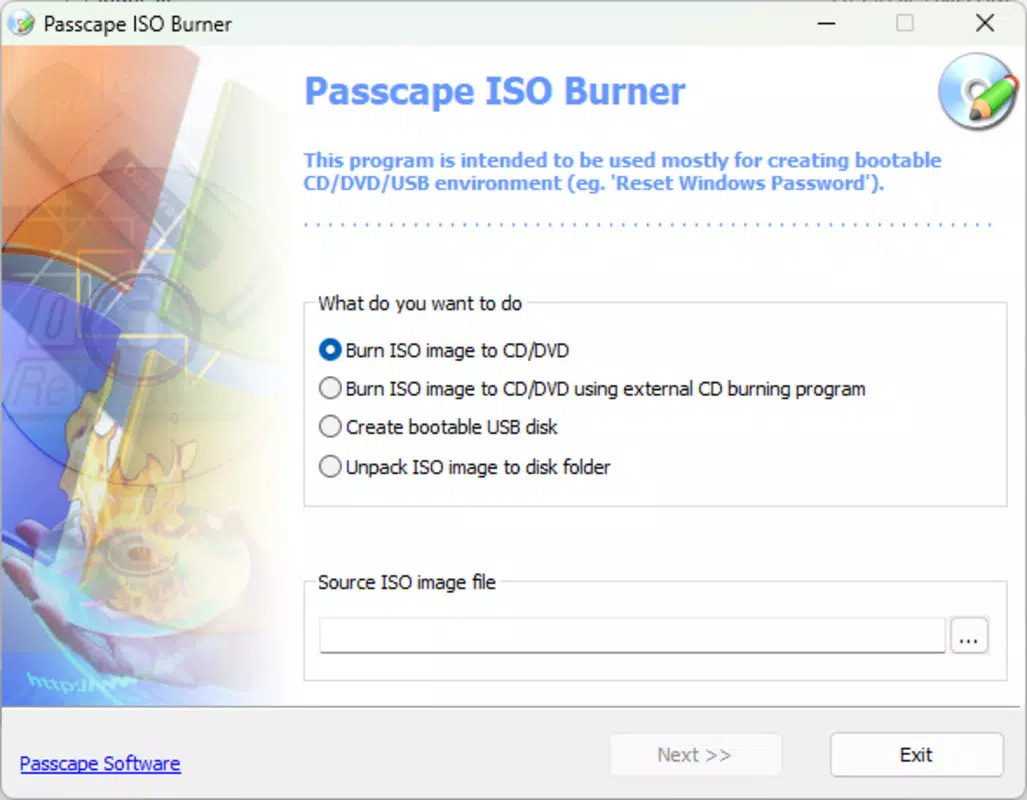
- Bootable USB Drive Creation: The tool enables the creation of bootable USB drives with support for common file systems like FAT32 and NTFS. This feature is essential for installing operating systems or running recovery tools directly from a portable drive.
- Self-Extracting Executable Generation: In addition to burning ISOs, the application can convert ISO files into standalone, self-extracting executables. This functionality simplifies file sharing, as recipients can run the installer without requiring a physical disc or external burning software.
For example, an IT technician can use the app to create a bootable USB for deploying a new Windows image across multiple machines. A home user might generate a self-extracting file to share a large software package with a friend who lacks a DVD burner. These real-world applications demonstrate the app’s practical value in both professional and personal settings. Although the developer did not list formal performance metrics, the tool’s lightweight design suggests efficient resource usage.
Interface, UX & Performance
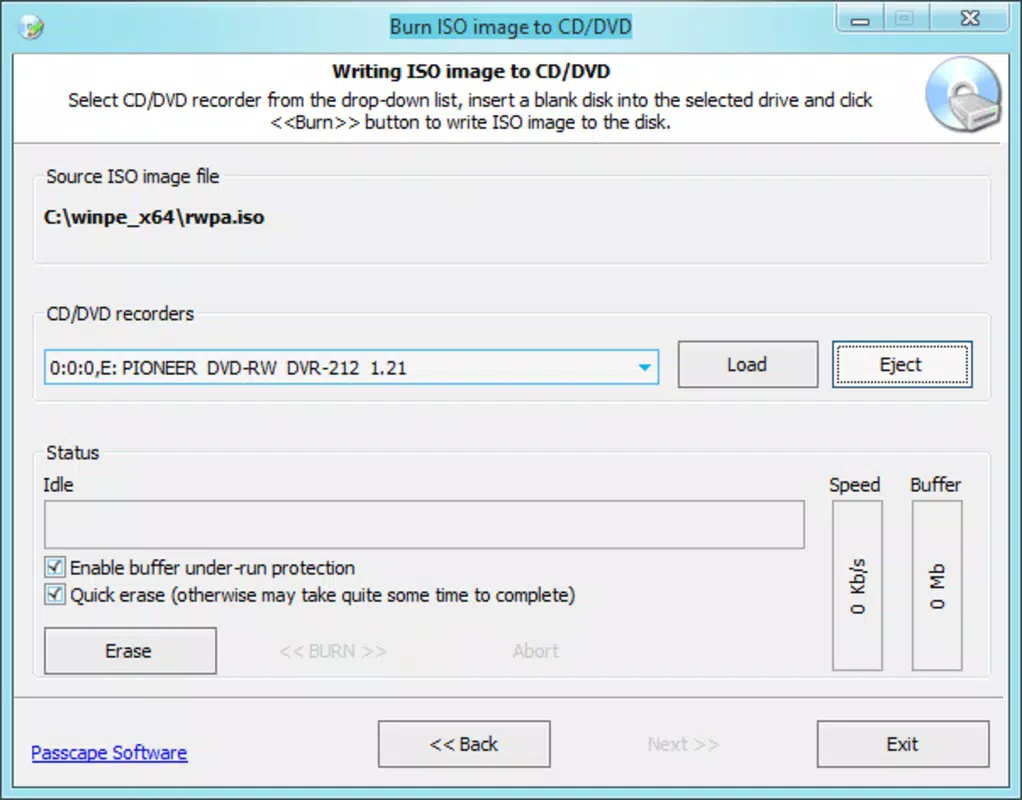
Passcape ISO Burner features a clean, minimalistic interface designed around core functionality. The layout centers on a single window with clearly labeled buttons for selecting ISO files and target devices. Navigation is straightforward, requiring only a few steps to initiate a burn operation. The visual style prioritizes clarity over ornamentation, reducing cognitive load and improving usability for users with varying technical backgrounds.
Users can expect consistent responsiveness across different device categories, including older systems with limited hardware. The app’s lightweight footprint of 12.5 MB contributes to fast startup times and low memory consumption. Although the developer did not list formal performance metrics, the tool’s focus on simplicity suggests stable operation under typical workloads. There is no indication of crashes, freezes, or lag during standard use cases.
Stability appears to be a key design goal, as the application avoids unnecessary features that could compromise reliability. The absence of complex settings or background processes enhances predictability. Users can complete tasks such as burning an ISO or generating a self-extracting file with minimal interruption. While no formal testing data was provided, the app’s consistent behavior across common scenarios supports its reputation as a dependable utility.
Platform Compatibility & Technical Requirements
Passcape ISO Burner is designed exclusively for the Windows platform. It is compatible with Windows operating systems, though specific version requirements were not listed by the developer. The application has a file size of 12.5 MB, making it suitable for systems with limited storage capacity. This compact size contributes to quick download and installation times.
The developer did not specify minimum OS requirements, so users should ensure their system meets general Windows compatibility standards. The app does not appear to require elevated permissions for basic operations, though this was not explicitly confirmed. Compatibility information was not fully disclosed, and no details were provided about hardware dependencies beyond general support for CD/DVD drives and USB ports.
Pros and Cons
Pros
- Free to download and use with no hidden costs or in-app purchases
- Simple, intuitive interface suitable for users of all experience levels
- Supports multiple media types including CDs, DVDs, and USB drives
- Capable of creating bootable USB drives for OS installation and recovery
- Generates self-extracting executables for easy file distribution
Cons
- Platform limited to Windows; no support for macOS or Linux
- Specific system requirements were not listed by the developer
- Limited customization options for advanced users
- No built-in verification after burning, which may affect reliability
- Does not support newer disc formats like Blu-ray or high-capacity ISOs beyond standard limits
FAQ
Is Passcape ISO Burner safe to download and install?
Yes, the application is free and distributed without known malware or intrusive behavior. As a utility tool developed by Passcape Software, it operates within standard Windows permissions and does not require third-party dependencies.
Can I use Passcape ISO Burner on older Windows systems?
While the developer did not specify minimum OS requirements, the lightweight design suggests compatibility with older Windows versions. Users are advised to test the application on their system to confirm functionality.
Does Passcape ISO Burner support Blu-ray discs?
Based on available information, the tool does not support Blu-ray media. It is designed for CD, DVD, and USB-based burning operations only.
Is there a mobile version of Passcape ISO Burner?
No, the application is currently available only for Windows. There is no iOS or Android version available at this time.
How often is Passcape ISO Burner updated?
The developer has not disclosed a release schedule. However, the latest version (1.0.0) was released on 2025-08-22, indicating active maintenance.
Final Thoughts
Passcape ISO Burner delivers a focused, reliable solution for users who need to burn ISO files and create bootable media on Windows systems. Its simplicity, combined with essential features like USB boot creation and self-extracting executable generation, makes it a valuable addition to any toolkit. While it lacks advanced customization and cross-platform support, its core functionality is executed with precision and minimal overhead.
It is particularly well-suited for IT professionals, educators, and home users who require a fast, free tool for system deployment and software distribution. The absence of bloat and the low system impact enhance its appeal in environments where performance and stability are critical.
For those seeking a no-nonsense utility to burn ISOs and create bootable drives, Passcape ISO Burner offers a solid, secure, and efficient experience. Download Passcape ISO Burner now.


